This page is a warm-up for joins and aggregates, using a database with several related tables. We will use the same data in Excel, so it is worth getting to know it here first.
Setup
First we run the two course setup chunks, which check versions and connect to DuckDB:
Course setup (R): check versions and load packages
# Checks that R and each package are installed and new enough for this course.# Stops with a list of everything that needs fixing, and how to fix it.check_course_versions <-function(required, area) { problems <-character(0) to_install <-character(0) found <-character(0)for (name innames(required)) { need <- required[[name]]if (name =="R") { have <-getRversion()if (have < need) { problems <-c(problems, sprintf("R is version %s; this course needs %s or newer. Install the current R from https://cran.r-project.org/ (see https://howisonlab.github.io/datawrangling/current/rtidyverse/rstudio_installation.html), then reinstall your packages.", have, need)) } found <-c(found, paste("R", have)) } elseif (!nzchar(system.file(package = name))) { problems <-c(problems, sprintf("%s is not installed.", name)) to_install <-c(to_install, name) } else { have <-packageVersion(name)if (have < need) { problems <-c(problems, sprintf("%s is version %s; this course needs %s or newer.", name, have, need)) to_install <-c(to_install, name) } elseif (isNamespaceLoaded(name) &&getNamespaceVersion(name) != have) { problems <-c(problems, sprintf("%s %s is installed, but this R session is still using %s. Restart R.", name, have, getNamespaceVersion(name))) } found <-c(found, paste(name, have)) } }if (length(problems) >0) { fix <-"In RStudio choose Session > Restart R"if (length(to_install) >0) { fix <-paste0(fix, ", then run this in the Console:\n install.packages(c(",paste0('"', to_install, '"', collapse =", "), "))\n") }stop("Course setup (", area, ") found problems:\n - ",paste(problems, collapse ="\n - "), "\n\n", fix, "\nThen run the setup chunk(s) again.", call. =FALSE) }cat("Course setup OK (", area, "): ", paste(found, collapse =", "), "\n", sep ="")}check_course_versions(c(R ="4.5.0", # CRAN builds Mac/Windows packages for the current and previous R onlytidyverse ="2.0.0",dplyr ="1.2.0", # recode_values() and replace_values()tidyr ="1.3.0", # separate_wider_delim()gt ="1.0.0", # needed by gtExtrasgtExtras ="0.6.1"# works with ggplot2 4), "R")library(tidyverse)library(gt)library(gtExtras)
Course setup OK (R): R 4.6.1, tidyverse 2.0.0, dplyr 1.2.1, tidyr 1.3.2, gt 1.3.0, gtExtras 0.6.2
Course setup (SQL): check versions and connect to DuckDB
# needs check_course_versions() from the Course setup (R) chunkcheck_course_versions(c(DBI ="1.0.0",duckdb ="1.5.5"# duckdb(shared_home = FALSE)), "SQL")library(DBI)library(duckdb)options(duckdb.enable_rstudio_connection_pane =TRUE)# a temporary in-memory database, nothing saved to a filedrv <-duckdb(shared_home =FALSE)con <-dbConnect(drv)
Course setup OK (SQL): DBI 1.3.0, duckdb 1.5.6
The database comes as six csv files, one per table. This R chunk downloads them from the course website and saves them in the same folder as your notebook. You only need to run it once.
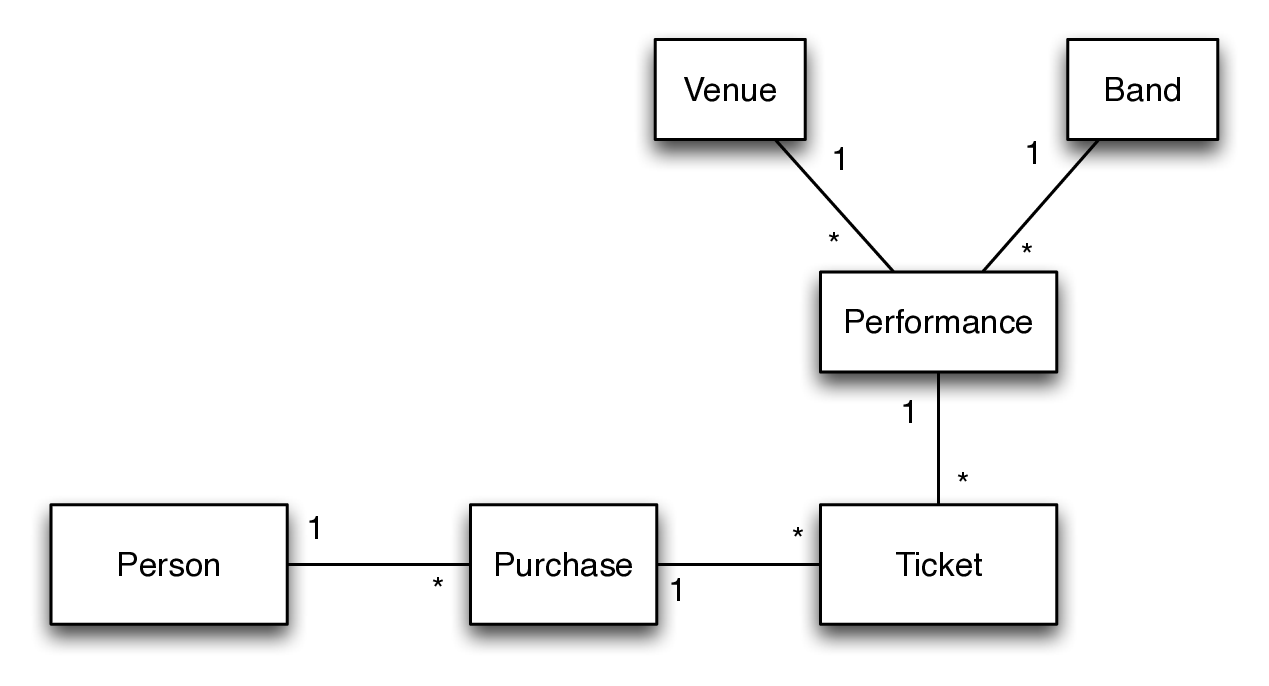
The data records ticket sales for a three-day music festival held in Austin in September 2011. Bands played on several stages (venues), and people bought tickets online in the months before the festival. Each ticket is for one performance.
The tables are linked by id columns. Each line below is a foreign key, and the * marks the “many” end: one band has many performances, so performances.band_id holds the id of a row in bands.
The music festival database
As always, the first question for each table is what one row represents:
Table
Rows
One row is
Links to
venues
10
a stage at the festival
bands
133
a band, with the fee it charges
performances
132
one band playing at one venue, at one time
venues, bands
people
10,768
a person who bought tickets
purchases
10,768
one checkout, when a person bought some tickets
people
tickets
107,673
one ticket, for one performance, bought in one purchase
performances, purchases
So to get from a ticket to the name of the band, you go tickets → performances → bands. To get from a ticket to the person who bought it, you go tickets → purchases → people.
Here are the first few rows of each table:
SELECT*FROM venues LIMIT5
5 records
id
name
capacity
1
AMD
700
2
Honda
2000
3
Austin Kiddie Limits presented by H-E-B
2300
4
Austin Ventures
2000
5
BMI
2000
SELECT*FROM bands LIMIT5
5 records
id
name
fee
1
The Antlers
1050
2
Young The Giant
1382
3
Iron & Wine
913
4
Cut Copy
754
5
My Morning Jacket
1586
SELECT*FROM performances LIMIT5
5 records
id
start
end
venue_id
band_id
1
2011-09-17 12:30:00
2011-09-17 13:15:00
1
1
2
2011-09-17 14:00:00
2011-09-17 15:00:00
1
2
3
2011-09-17 16:00:00
2011-09-17 17:00:00
1
3
4
2011-09-17 18:00:00
2011-09-17 19:00:00
1
4
5
2011-09-17 20:00:00
2011-09-17 21:30:00
1
5
SELECT*FROM people LIMIT5
5 records
id
name
1361
A
7486
A Dehpewit
4175
A Deyzhdoax
2689
A Eawzeb
5470
A Hmpynvir
SELECT*FROM purchases LIMIT5
5 records
id
date
person_id
1
2011-05-02 01:29:45
1
2
2011-06-19 18:51:53
2
3
2011-03-27 21:41:06
3
4
2011-03-06 22:30:20
4
5
2011-07-19 17:08:04
5
SELECT*FROM tickets LIMIT5
5 records
id
price
ticketnum
performance_id
purchase_id
1
27
TA1857962
74
1
2
5
TA2692304
79
1
3
13
TA2539340
11
1
4
9
TA1340905
93
1
5
6
TA3440858
46
1
CautionThings to watch for
Almost every name in people ends with a space: 'Domhog Kiwter ', not 'Domhog Kiwter'. Use TRIM(people.name) when you search for a person.
end and date are SQL keywords, so if you use those columns on their own write them in double quotes: "end", "date". (performances.end with the table name works too.)
The data is real-world messy: some rows in bands look like tests.
Worked example: which bands played at the BMI venue?
We are given a venue name, so we start in venues and find BMI:
SELECT*FROM venuesWHERE venues.name ='BMI'
1 records
id
name
capacity
5
BMI
2000
The band names are in bands, but venues and bands aren’t linked directly. We get there through performances. First attach the performances at each venue:
SELECT*FROM venuesJOIN performances ON performances.venue_id = venues.idWHERE venues.name ='BMI'
Displaying records 1 - 10
id
name
capacity
id
start
end
venue_id
band_id
5
BMI
2000
13
2011-09-17 11:15:00
2011-09-17 12:00:00
5
13
5
BMI
2000
18
2011-09-17 12:30:00
2011-09-17 13:15:00
5
18
5
BMI
2000
25
2011-09-17 14:00:00
2011-09-17 15:00:00
5
25
5
BMI
2000
32
2011-09-17 16:00:00
2011-09-17 17:00:00
5
32
5
BMI
2000
37
2011-09-17 18:00:00
2011-09-17 19:00:00
5
37
5
BMI
2000
50
2011-09-16 11:15:00
2011-09-16 12:00:00
5
50
5
BMI
2000
58
2011-09-16 12:45:00
2011-09-16 13:30:00
5
57
5
BMI
2000
64
2011-09-16 14:30:00
2011-09-16 15:30:00
5
62
5
BMI
2000
74
2011-09-16 16:30:00
2011-09-16 17:30:00
5
71
5
BMI
2000
79
2011-09-16 18:30:00
2011-09-16 19:30:00
5
76
Each join attaches to the result so far, so the next JOIN can use performances.band_id to attach the band:
SELECT*FROM venuesJOIN performances ON performances.venue_id = venues.idJOIN bands ON performances.band_id = bands.idWHERE venues.name ='BMI'
Displaying records 1 - 10
id
name
capacity
id
start
end
venue_id
band_id
id
name
fee
5
BMI
2000
13
2011-09-17 11:15:00
2011-09-17 12:00:00
5
13
13
Tyler Bryant
1184
5
BMI
2000
18
2011-09-17 12:30:00
2011-09-17 13:15:00
5
18
18
The Kingston Springs
1940
5
BMI
2000
25
2011-09-17 14:00:00
2011-09-17 15:00:00
5
25
25
Jon Pardi
823
5
BMI
2000
32
2011-09-17 16:00:00
2011-09-17 17:00:00
5
32
32
Chancellor Warhol
1672
5
BMI
2000
37
2011-09-17 18:00:00
2011-09-17 19:00:00
5
37
37
Patrice Pike
1137
5
BMI
2000
50
2011-09-16 11:15:00
2011-09-16 12:00:00
5
50
50
Hudson Moore
1171
5
BMI
2000
58
2011-09-16 12:45:00
2011-09-16 13:30:00
5
57
57
Ha Ha Tonka
911
5
BMI
2000
64
2011-09-16 14:30:00
2011-09-16 15:30:00
5
62
62
Bobby Long
926
5
BMI
2000
74
2011-09-16 16:30:00
2011-09-16 17:30:00
5
71
71
Beardyman
915
5
BMI
2000
79
2011-09-16 18:30:00
2011-09-16 19:30:00
5
76
76
Gary Clark Jr.
1194
Finally keep just the column we want:
SELECT bands.nameFROM venuesJOIN performances ON performances.venue_id = venues.idJOIN bands ON performances.band_id = bands.idWHERE venues.name ='BMI'ORDERBY bands.name
Displaying records 1 - 10
name
Beardyman
Bobby Long
Chancellor Warhol
Courtney Jaye
Gary Clark Jr.
Ha Ha Tonka
Hudson Moore
Jon Pardi
MilkDrive
Patrice Pike
Exercises
Build each query up a step at a time, as in the worked example, and keep an eye on the number of rows. Start by asking which table the information you are given is in, and which table the answer is in.
Joins
Write the join condition for each pair of linked tables in the diagram. The first one is done for you.
Tables
Join condition
people and purchases
people.id = purchases.person_id
purchases and tickets
tickets and performances
performances and venues
performances and bands
Who purchased ticket number TA9875424?
Which band that performed at the AMD venue had the highest fee?
What is the first show (band name, venue name and start time) that Domhog Kiwter has a ticket to?
Which bands never performed at the festival? (Hint: LEFT JOIN, and look for the NULLs.)
Aggregates
How many tickets were sold in total, and what was the total revenue? Answer both in a single query.
What was the revenue for each performance? Show the band name too, with the highest revenue first.
How many tickets were sold for performances at each venue?
What was the revenue at each venue on each day of the festival? (Hint: DAY(performances.start) gives the day of the month.) Keep the result: in Excel we will turn this into a table with days across the top.