Course setup (R): check versions and load packages
# Checks that R and each package are installed and new enough for this course.# Stops with a list of everything that needs fixing, and how to fix it.check_course_versions <-function(required, area) { problems <-character(0) to_install <-character(0) found <-character(0)for (name innames(required)) { need <- required[[name]]if (name =="R") { have <-getRversion()if (have < need) { problems <-c(problems, sprintf("R is version %s; this course needs %s or newer. Install the current R from https://cran.r-project.org/ (see https://howisonlab.github.io/datawrangling/current/rtidyverse/rstudio_installation.html), then reinstall your packages.", have, need)) } found <-c(found, paste("R", have)) } elseif (!nzchar(system.file(package = name))) { problems <-c(problems, sprintf("%s is not installed.", name)) to_install <-c(to_install, name) } else { have <-packageVersion(name)if (have < need) { problems <-c(problems, sprintf("%s is version %s; this course needs %s or newer.", name, have, need)) to_install <-c(to_install, name) } elseif (isNamespaceLoaded(name) &&getNamespaceVersion(name) != have) { problems <-c(problems, sprintf("%s %s is installed, but this R session is still using %s. Restart R.", name, have, getNamespaceVersion(name))) } found <-c(found, paste(name, have)) } }if (length(problems) >0) { fix <-"In RStudio choose Session > Restart R"if (length(to_install) >0) { fix <-paste0(fix, ", then run this in the Console:\n install.packages(c(",paste0('"', to_install, '"', collapse =", "), "))\n") }stop("Course setup (", area, ") found problems:\n - ",paste(problems, collapse ="\n - "), "\n\n", fix, "\nThen run the setup chunk(s) again.", call. =FALSE) }cat("Course setup OK (", area, "): ", paste(found, collapse =", "), "\n", sep ="")}check_course_versions(c(R ="4.5.0", # CRAN builds Mac/Windows packages for the current and previous R onlytidyverse ="2.0.0",dplyr ="1.2.0", # recode_values() and replace_values()tidyr ="1.3.0", # separate_wider_delim()gt ="1.0.0", # needed by gtExtrasgtExtras ="0.6.1"# works with ggplot2 4), "R")library(tidyverse)library(gt)library(gtExtras)
Course setup OK (R): R 4.6.1, tidyverse 2.0.0, dplyr 1.2.1, tidyr 1.3.2, gt 1.3.0, gtExtras 0.6.2
Course setup (SQL): check versions and connect to DuckDB
# needs check_course_versions() from the Course setup (R) chunkcheck_course_versions(c(DBI ="1.0.0",duckdb ="1.5.5"# duckdb(shared_home = FALSE)), "SQL")library(DBI)library(duckdb)options(duckdb.enable_rstudio_connection_pane =TRUE)# a temporary in-memory database, nothing saved to a filedrv <-duckdb(shared_home =FALSE)con <-dbConnect(drv)
Course setup OK (SQL): DBI 1.3.0, duckdb 1.5.6
The SQL setup chunk creates a temporary in-memory database. To keep your tables in a file instead, use drv <- duckdb(dbdir = "my_database.duckdb", shared_home = FALSE).
Joins
Joins are a key capability of SQL databases, and the underlying optimizations used for Joins are a core reason that SQL has remained so core to data work.
Often we want to combine data from different tables.
Take this example:
Show the code that creates the hobbies and majors tables
There are actually quite a few different ways to bring these data together.
Notice that the students in each table are overlapping. Some are in both tables (Shuyen and Brian), but others are only in one of the tables (Adnan in hobbies, Yungsheng in majors).
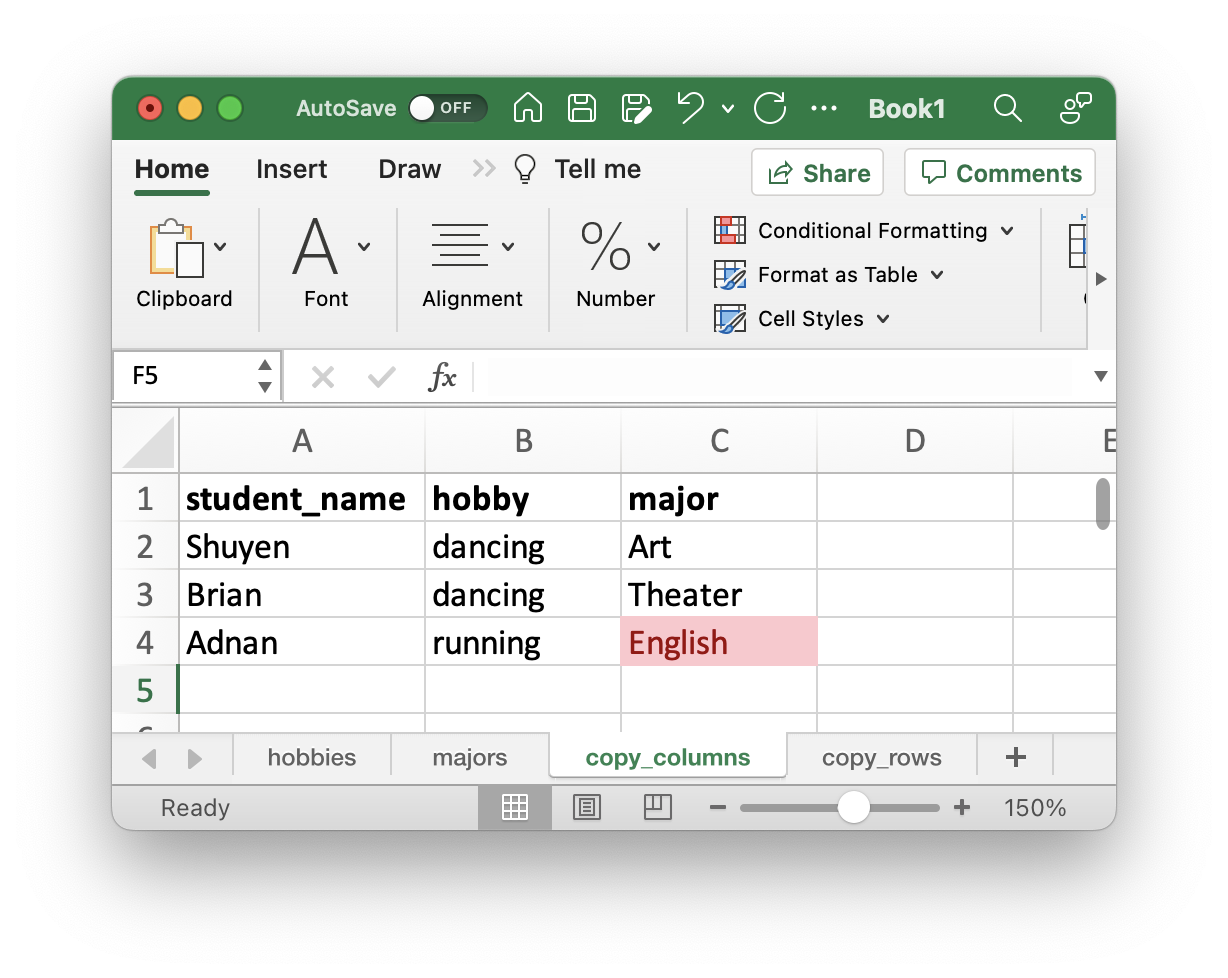
One thing we can’t do is (pretending we are in Excel land) we can’t just copy the major column and paste it next to the student_hobbies columns. If we do that, we will end up with an incorrect row that claims that Adnan is in the English major. So Yungsheng’s data ends up on Adnan’s row.
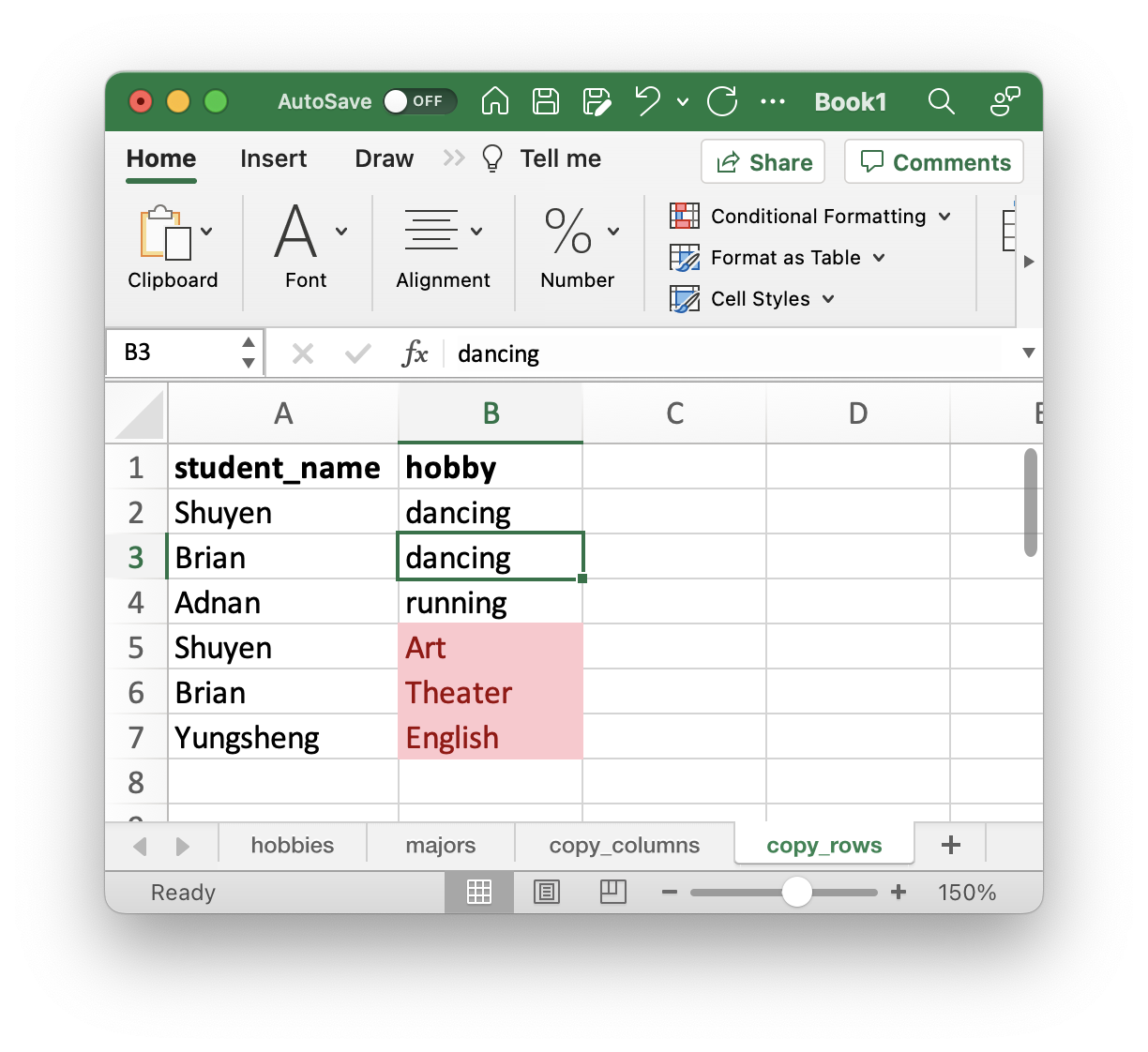
We also can’t copy both columns and paste them underneath. If we do that the values from major will end up in the hobby column.
But SQL databases know ways to combine the tables that preserve the meaning of the data.
How a join works: every pairing, then filter
How does SQL know which rows go together? It helps to think of a join as two steps: first pair up every row in one table with every row in the other, then keep only the pairings that make sense.
The first step is called a CROSS JOIN (or cross product):
SELECT*FROM hobbiesCROSSJOIN majors
hobbies
majors
name
hobby
name
major
Shuyen (both tables)
dancing
Shuyen (both tables)
Art
Shuyen (both tables)
dancing
Brian (both tables)
Theater
Shuyen (both tables)
dancing
Yungsheng (majors only)
English
Brian (both tables)
dancing
Shuyen (both tables)
Art
Brian (both tables)
dancing
Brian (both tables)
Theater
Brian (both tables)
dancing
Yungsheng (majors only)
English
Adnan (hobbies only)
running
Shuyen (both tables)
Art
Adnan (hobbies only)
running
Brian (both tables)
Theater
Adnan (hobbies only)
running
Yungsheng (majors only)
English
Nine rows: each of the 3 rows in hobbies paired with each of the 3 rows in majors. The colours show where each cell came from: each row of hobbies has its own shade of blue, and each row of majors its own shade of green. Reading down, each blue repeats 3 times while the greens cycle through all 3 majors rows. (The rows are sorted here to make that easy to see; when you run the query yourself they may come back in a different order.)
But … that’s odd, because most of these rows don’t reflect what we know. One row says Shuyen dances and is a Theater major, but that’s Brian’s major. Another pairs Adnan with Yungsheng’s English major. On the other hand, the table does contain all of the true rows (Shuyen with Art, Brian with Theater). This is like the string database from the card exercise: the true rows are the ones that follow a single string, not ones that veer off to connect to someone else.
So what condition would keep the true rows and eliminate the rest?
The true rows are those where the name from hobbies is the same as the name from majors. We already know how to eliminate rows with WHERE. Until now we have compared a column to a concrete value, like series = 'Harry Potter', but we can put a column name on both sides of the =. It is still a True or False question asked of each row, using the values in that row:
This is the same as the cross join plus WHERE above. The JOIN keyword didn’t exist in early SQL (from the 1970s to the mid 1990s), which is why this is sometimes called the “old style” join, or an “implicit join”. In this course we use JOIN ... ON.
Inner and Outer Joins
When we join we have two kinds of rows:
Those that were in both tables (as above)
Those that were only in a single table
JOIN on its own (as above) only keeps those that were in both tables. This is called an INNER join.
If we also want to keep some of the rows that didn’t match, we can, and these are called OUTER joins.
Outer joins do this by filling in the columns from the other table with NULL for the rows that didn’t match. We also have to specify which unmatched rows we want to keep (only those from the LEFT table? only those from the RIGHT table? Or those from both?)
In this way, we will look at four different ways to combine these tables: 1) FULL JOIN, 2) LEFT JOIN, 3) RIGHT JOIN, and 4) INNER JOIN
Where do the NULLs come from?
We can extend our “every pairing, then filter” picture to explain the NULLs. Imagine that each table has one extra row that is completely empty (all NULL):
Show the code that creates the hobbies and majors tables with an extra NULL row
Every row of every join result is somewhere in those 16 rows. These are the four that matter:
hobbies name
hobby
majors name
major
kept by
Shuyen (both tables)
dancing
Shuyen (both tables)
Art
all four joins
Brian (both tables)
dancing
Brian (both tables)
Theater
all four joins
Adnan (hobbies only)
running
NULL
NULL
LEFT, FULL
NULL
NULL
Yungsheng (majors only)
English
RIGHT, FULL
INNER JOIN keeps only the pairings where the names match.
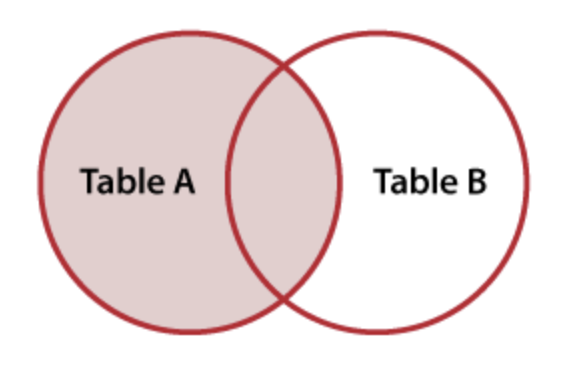
LEFT JOIN also keeps the pairing with the empty row for each row in the left table that found no match (Adnan).
RIGHT JOIN does the same for the right table (Yungsheng).
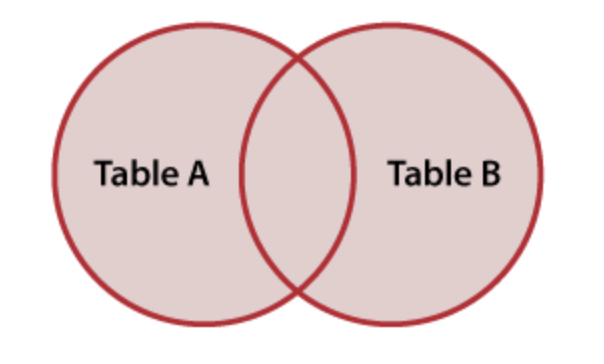
FULL JOIN does both.
Notice that Shuyen is also paired with the empty row, but that pairing is not kept, because Shuyen already found a match. The empty row is only used for rows that have no match at all. The pairing of the two empty rows is never kept.
This is a way of thinking about joins, not what the database actually does: it never builds all 16 rows.
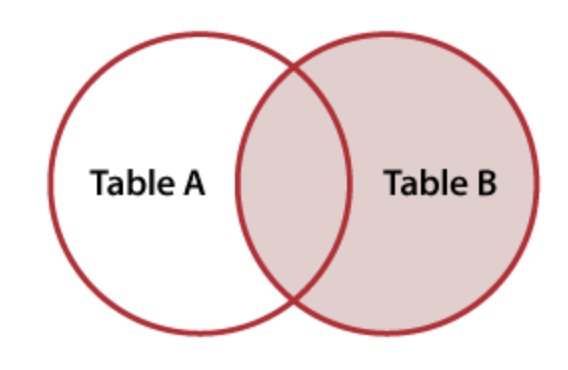
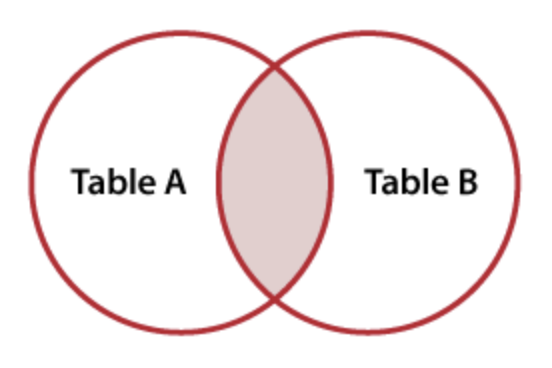
FULL JOIN
LEFT JOIN
RIGHT JOIN
INNER JOIN
Images from https://learnsql.com/blog/sql-joins/
To keep the result tables below easy to read, they show a single name column. When you run these queries you will see two name columns, one from each table; see Join conditions (ON and USING) for why, and what to do about it.
FULL JOIN
The first keeps all of the data, matching up rows and adding NULL values where rows are only in one table or the other. This is called the FULL JOIN.
SELECT*FROM hobbies FULLJOIN majors ON hobbies.name = majors.name
full_join_result
name
hobby
major
Shuyen (both tables)
dancing
Art
Brian (both tables)
dancing
Theater
Adnan (hobbies only)
running
NULL
Yungsheng (majors only)
NULL
English
LEFT and RIGHT JOIN
We can also keep all of the data from one table, and add in only the matching data from the other table. This is called the LEFT JOIN or the RIGHT JOIN. The direction just points to which table we will keep all the rows from.
LEFT JOIN
SELECT*FROM hobbies LEFTJOIN majors ON hobbies.name = majors.name
left_join_result
name
hobby
major
Shuyen (both tables)
dancing
Art
Brian (both tables)
dancing
Theater
Adnan (hobbies only)
running
NULL
RIGHT JOIN
SELECT*FROM hobbies RIGHTJOIN majors ON hobbies.name = majors.name
right_join_result
name
hobby
major
Shuyen (both tables)
dancing
Art
Brian (both tables)
dancing
Theater
Yungsheng (majors only)
NULL
English
These are really useful when we have data in a table about things and we want to “bring over” any data we have about those things.
Note
A RIGHT JOIN is identical to a LEFT JOIN with the tables reversed in order. This makes it almost never used as people would just rewrite it as a LEFT JOIN. So one generally doesn’t come across RIGHT JOIN. ie:
majors RIGHTJOIN hobbies
is identical to
hobbies LEFTJOIN majors
INNER JOIN
Finally, our fourth option is to only keep rows that have data in both tables. This is the INNER JOIN from above.
inner_join_result
name
hobby
major
Shuyen (both tables)
dancing
Art
Brian (both tables)
dancing
Theater
Notice that, in some sense, the INNER JOIN drops data? Neither Adnan nor Yungsheng show up in these results at all. Sometimes that is appropriate, sometimes that is problematic.
Language confusion on Inner vs Outer
Joins are frequently talked about as being two kinds, inner and outer.
FULL, LEFT and RIGHT are all OUTER joins.
Because LEFT JOIN is by far the most used, if someone were to just say “outer join” then they almost always mean LEFT JOIN. OUTER JOIN on its own will throw an error.
INNER JOIN is the only inner join (there is only one way to include only the rows that match), it is used frequently enough that JOIN with no other word means INNER JOIN.
Note
R tidyverse has the same four joins, with matching names: full_join, left_join, right_join, and inner_join. The left_join we used for lookups in R is a LEFT JOIN.
JOIN synonyms
Square brackets shows optional part.
FULL [OUTER] JOINLEFT [OUTER] JOIN-- Often say "outer join"RIGHT [OUTER] JOIN[INNER] JOIN-- might just say just "join"
Caution
Many people are confused about the language here.
It is very common for people to think that a LEFT JOIN is not a kind of OUTER join. They may think that only a FULL OUTER JOIN is an OUTER JOIN.
They may become enraged if you insist on this.
Try to get comfortable with the two most common joins. INNER JOIN and LEFT JOIN. One useful way to think of this is:
INNER JOIN: All the rows where there is a match (and none of the rows where there is no match) LEFT JOIN: Keep everything in the left table, and add any matching rows from the other table. This is sometimes called “adding matching data, if any” and is used to do “lookups”.
Warning
Be aware that some people will say “join” when they are talking, but they will by default write LEFT JOIN, so they actually mean LEFT JOIN but they just say “join” (even though JOIN on its own is an inner join).
I dunno, it’s a mess. Don’t blame me.
At least LEFT JOIN never drops data (from the left hand table at least!)
Join conditions (ON and USING)
As we saw above, the ON clause is the filtering step: it says which columns have to match for a pairing of rows to be kept. The general form is
ON left_table.column= right_table.column
Running our LEFT JOIN from above:
SELECT*FROM hobbies LEFTJOIN majors ON hobbies.name = majors.name
3 records
name
hobby
name
major
Shuyen (both tables)
dancing
Shuyen (both tables)
Art
Brian (both tables)
dancing
Brian (both tables)
Theater
Adnan (hobbies only)
running
NA
NA
Note that when we use ON we get back all of the columns from both tables, so there are two columns called name: one from hobbies and one from majors.
There is a special shorthand when the column name is the same in both tables, USING column_name. Making it:
SELECT*FROM hobbies LEFTJOIN majors USING (name)
3 records
name
hobby
major
Shuyen (both tables)
dancing
Art
Brian (both tables)
dancing
Theater
Adnan (hobbies only)
running
NA
One advantage of USING is that you only get one name column back. But it only works when columns are named exactly the same, something that often isn’t the case (including when working with id and foreign_id columns).
Here are the other three joins from above, now with a join condition:
SELECT*FROM hobbies RIGHTJOIN majors USING (name)
3 records
name
hobby
major
Shuyen (both tables)
dancing
Art
Brian (both tables)
dancing
Theater
Yungsheng (majors only)
NA
English
SELECT*FROM hobbies INNERJOIN majors USING (name)
2 records
name
hobby
major
Shuyen (both tables)
dancing
Art
Brian (both tables)
dancing
Theater
SELECT*FROM hobbies FULLJOIN majors USING (name)
4 records
name
hobby
major
Shuyen (both tables)
dancing
Art
Brian (both tables)
dancing
Theater
Adnan (hobbies only)
running
NA
Yungsheng (majors only)
NA
English
The two name columns are not a problem when doing a LEFT JOIN with ON, because the second name column only repeats content, so you can just drop or ignore it. But if you are doing a FULL OUTER JOIN with ON, the names from the left table are in one name column and the names from the right table are in the other, each with gaps:
SELECT*FROM hobbies FULLJOIN majors ON hobbies.name = majors.name
4 records
name
hobby
name
major
Shuyen (both tables)
dancing
Shuyen (both tables)
Art
Brian (both tables)
dancing
Brian (both tables)
Theater
Adnan (hobbies only)
running
NA
NA
NA
NA
Yungsheng (majors only)
English
In this (rare but confusing) case, we can use COALESCE to merge the two name columns into one:
SELECTCOALESCE(majors.name, hobbies.name) AS name, hobby, majorFROM hobbiesFULLOUTERJOIN majors ON hobbies.name = majors.name
4 records
name
hobby
major
Shuyen (both tables)
dancing
Art
Brian (both tables)
dancing
Theater
Adnan (hobbies only)
running
NA
Yungsheng (majors only)
NA
English
COALESCE works by looking at each row, working left to right in the columns you give it, taking the first non-null value it encounters. Given that, the order you put the columns in the COALESCE doesn’t matter, when working with a FULL OUTER JOIN.
Looking up values
One important use of JOIN is to lookup the value of some code, such as abbreviations. This is a little like “find and replace,” using a second table to lookup values, doing many different “find and replace” all at once.
Consider these data:
countries
english_name
iso_code3
iso_code2
China
CHN
CN
Australia
AUS
AU
United States of America
USA
US
Now we can use these to convert an iso_code to an english name for a country. Consider:
olympic_medals
country
year_occurred
medal_count
AU
1984
20
CN
1984
30
USA
1984
29
AU
1980
20
CN
1980
30
Show the code that creates the countries and olympic_medals tables
We can use a JOIN to lookup values in countries, or “bring over” the matching values from countries, so that each row that has “CN” has “China” in a new column, each row that has “AU” has “Australia” etc.
SELECT*FROM olympic_medalsLEFTJOIN countries ON olympic_medals.country = countries.iso_code2
5 records
country
year_occurred
medal_count
english_name
iso_code3
iso_code2
AU
1984
20
Australia
AUS
AU
CN
1984
30
China
CHN
CN
AU
1980
20
Australia
AUS
AU
CN
1980
30
China
CHN
CN
USA
1984
29
NA
NA
NA
You can see that using joins by default brings over all of the columns, but we can use SELECT to get just those we want, renaming using AS if we wish.
SELECT english_name AS country_name, year_occurred, medal_countFROM olympic_medalsLEFTJOIN countries ON olympic_medals.country = countries.iso_code2
5 records
country_name
year_occurred
medal_count
Australia
1984
20
China
1984
30
Australia
1980
20
China
1980
30
NA
1984
29
Note that I used a LEFT JOIN above. Look at the USA row in the results: it has no country_name. Its code, USA, is a three-letter code, but we joined on iso_code2, the two-letter codes, so nothing matched. Because we used LEFT JOIN, the row is kept and we can see the problem.
If I used just JOIN on its own I would get an inner join, and the USA row would disappear from the results entirely:
SELECT english_name AS country_name, year_occurred, medal_countFROM olympic_medalsJOIN countries ON olympic_medals.country = countries.iso_code2
4 records
country_name
year_occurred
medal_count
Australia
1984
20
China
1984
30
Australia
1980
20
China
1980
30
Four rows instead of five, with no error or warning. That isn’t usually what we want, so LEFT JOIN protects against that.
Discuss:
Which row didn’t get matched up in the LEFT JOIN results? What does country_name show for it? How could we change the lookup so that it matches?
Talk it through, then read on.
Note
If someone is doing a “lookup” then they will almost always use a LEFT JOIN followed later in their workflow by dropping null values. That makes the dropping of data more explicit.
Fixing the lookup: one column of codes
The problem is that olympic_medals mixes two kinds of code, but our join can only look in one column of countries at a time. The countries table is wide: each country has its codes spread across two columns, iso_code3 and iso_code2.
If we take countries longer, using UNPIVOT (from SQL Transforms), all of the codes end up in a single code column, with one row per code:
UNPIVOT countriesON iso_code3, iso_code2INTO NAME code_typeVALUE code
6 records
english_name
code_type
code
China
iso_code3
CHN
China
iso_code2
CN
Australia
iso_code3
AUS
Australia
iso_code2
AU
United States of America
iso_code3
USA
United States of America
iso_code2
US
Now every code, two-letter or three-letter, is in the same column. We save that as a new table:
CREATEORREPLACETABLE countries_long AS UNPIVOT countriesON iso_code3, iso_code2INTO NAME code_typeVALUE code
and join on the code column:
SELECT english_name AS country_name, year_occurred, medal_countFROM olympic_medalsLEFTJOIN countries_long ON olympic_medals.country = countries_long.code
5 records
country_name
year_occurred
medal_count
China
1980
30
Australia
1980
20
United States of America
1984
29
China
1984
30
Australia
1984
20
All five rows are matched, including USA. Check the row count, though: we started with five rows in olympic_medals, and we still have five. That is because each code appears only once in the code column. If the same code appeared twice (say, as a two-letter code for one country and a three-letter code for another), a row could match twice, and the join would quietly add rows. Whenever you join, compare the number of rows before and after.
Exercises
For more practice, these interactive exercises run in the browser, no setup needed:
Use a join to bring the region column to the country_medals table.
Show the query
SELECT*FROM country_medalsLEFTJOIN country_regions ON country_medals.country = country_regions.english_name
3 records
country
gold_medal_count
english_name
region
Australia
33
Australia
Oceania
South Korea
13
NA
NA
USA
34
NA
NA
Talk with your neighbor about the result. Why is this not working well? How can the country_codes table help us?
Use a join to add the appropriate canonical_name to the country_medals table
Show the query
SELECT*FROM country_medalsLEFTJOIN country_codes ON country_medals.country = country_codes.alternative_name
3 records
country
gold_medal_count
canonical_name
alternative_name
USA
34
United States
USA
South Korea
13
South Korea
South Korea
Australia
33
Australia
Australia
Store the results of Q3 as a table called country_medals_canonical (using CREATE OR REPLACE TABLE, see Saving pipeline steps as tables).
Use a similar join to lookup the canonical_name to the country_regions table and store that result in a country_regions_canonical table.
Now use a join between those two tables to produce results with canonical_name, region, gold_medal_count columns.
Using JOIN with foreign key columns
In SQL database tables often use numbers as ids. These include both primary keys and foreign keys that refer back to the primary key. We will not cover this in our course, but it is something you should learn together with Entity Relationship diagrams and Normalization to restructuring data to become Third Normal Form
Here is an example of data from our initial exercise (the red mug and the green pen). We have split the data into two tables (objects) and colors. Here each table has a primary key id and there is one foreign key color_id.
objects
id
name
color_id
1
Mug
10
2
Pen
20
colors
id
name
10
red
20
green
Show the code that creates the objects and colors tables
We can use joins to lookup the color for each object. This is just like the case above, except instead of AU and CN we have the 10 and 20 labels in color_id.
SELECT*FROM objectsJOIN colors ON objects.color_id = colors.id
2 records
id
name
color_id
id
name
1
Mug
10
10
red
2
Pen
20
20
green
Note that both objects and colors have a column name (and a column id), so the results have two of each. SQL allows this in results tables, but it is confusing so we usually use AS to rename things.
SELECT objects.name AS object_name, colors.name AS color_nameFROM objectsJOIN colors ON objects.color_id = colors.id
2 records
object_name
color_name
Mug
red
Pen
green
This pattern of joining with an ON condition that matches up a primary key and a foreign key is very common in databases designed with keys, and you will see it often. The id is used in other tables to represent a relationship with a row in a different table. This allows us to stitch back together data that is spread across databases.
You may notice that I’ve used JOIN (inner join) rather than LEFT JOIN (outer join) in this example. This is because when we have primary and foreign key columns we usually have “well-formed” data with “referential integrity” meaning that we don’t have “orphaned records”: every id in a foreign key column exists in the table it refers to. For example, we could add a new object, a purple pencil.
INSERTINTO objects VALUES (3, 'Pencil', 30)
(If you run that cell twice you will get two pencils; re-run the cell that creates the objects and colors tables to start again.)
But the colors table does not have a row for purple (30, purple), so beware that using just JOINwill silently drop our pencil.
You can watch out for this as you build up your sequence of queries, using -- sql comments to keep track of the number of rows.
SELECT*FROM objects--> 3 rows
3 records
id
name
color_id
1
Mug
10
2
Pen
20
3
Pencil
30
-- Now join to colors table to convert color_id to a color name.SELECT*FROM objects JOIN colors ON objects.color_id = colors.id--> 2 rows?????????????????????????-- Why did this drop to 2 rows?
2 records
id
name
color_id
id
name
1
Mug
10
10
red
2
Pen
20
20
green
SELECT*FROM objects LEFTJOIN colors ON objects.color_id = colors.id-- 3 rows. hmmm, the pencil doesn't have a color. Are we missing a color definition?
3 records
id
name
color_id
id
name
1
Mug
10
10
red
2
Pen
20
20
green
3
Pencil
30
NA
NA
Historically databases enforced “referential integrity” by marking foreign key columns with REFERENCES in the CREATE TABLE statement. This ensured that you could not insert a row with a “hanging” foreign key. If you tried the database would throw an error.
Today the fashion seems to be to avoid specifying these checks in the database itself. The argument for this approach is that these sort of checks are part of a wider set of validation requirements. For example, checking that a phone number matches a valid particular pattern, or a mailing address is valid, or an age is not negative. The tendency is to push validation outside the database, such as to javascript libraries (for data coming from web forms) or to test steps in data engineering toolchains.
In the data engineering and data warehouse world, this practice (of not specifying REFERENCES relationships in the table definitions) is reinforced in data engineering pipelines, because data is imported table by table, so there frequently are situations where foreign keys do not resolve, at least temporarily. The approach in data engineering is to import all data, then sort it out in the pipeline.
The takeaway here is that using LEFT JOIN when joining tables with primary and foreign keys is certainly a legitimate and important part of data validation and should probably be the default during data exploration.
The downside of using an outer join, though, is that all the records in the left table are retained. When working interactively doing data exploration, this can be problematic when the amount of data is large.
For example, you might be working with data like this in your projects. You might have a table with data for every city in the country … but you only have weather data for a few of them. In your project you probably want to drop data for which you don’t have matching data. So then you might just use JOIN rather than LEFT JOIN (which would leave you with lots of NULLs)
Using AS in joins (table abbreviations)
As you can see above, joins can get long and the ON conditions in particular are often hard to fit on one line. They get even longer if one adds conditions in the WHERE clause.
We can provide abbreviations to tables to shorten queries. We do this with FROM table AS t
For example, FROM objects AS o and JOIN colors AS c would shorten the query above somewhat:
SELECT o.name AS object_name, c.name AS color_nameFROM objects AS o JOIN colors AS c ON o.color_id = c.id
2 records
object_name
color_name
Mug
red
Pen
green
This is useful, although the definition of the abbreviation comes in the middle of the query, after it has already been used.
Aliasing tables is common and you will find it very frequently when searching online. However, reasonable people can disagree about its usefulness.
Pros: - Queries are faster to type - Queries can be more compact, and compactness helps legibility especially when line wraps are avoided
Cons:
Abbreviations can be ambiguous. They are not always obvious, especially when tables start with the same letters. Does p refer to people or purchases? Different analysts might resolve this in different ways, or even the same analyst may use different abbreviations in different queries with different combinations of tables.
It can be harder to share queries with others, as abbreviations might not be standardized across groups.
“So p is always people. Well, unless purchases is also in the query, then I use pp for people and pr for purchases. But Katherine, I think, uses ppl or she used to. Oh, and if you join to peters_report try not to use pr? Got it?
Column names can’t be abbreviated, so advantages are partial.
It can be hard to remember abbreviations when reading queries with many tables, especially if you haven’t worked with the data frequently.
Given that SQL is usually written with tab completion for table names, and colored syntax highlighting, table aliasing may not be as important. Although, given that we write little snippets of SQL everywhere (Slack channels, web Q&A, email) and compactness can help spot errors it will probably persist.
Note
Notice the conventions used by those around you, ask what your team prefers.
Joining 3 or more tables
Joins are not limited to two tables. The “every pairing, then filter” idea works the same way with three, we just have more pairings and need more conditions.
Let’s add a third table about the students, home_towns. To keep things easy to read, the students who are in every table are now just Shuyen and Brian, and each table has one student who is only in that table.
Show the code that creates the hobbies, majors, and home_towns tables
Six rows, not two. The condition matches up hobbies and majors, but nothing says which home town goes with which student, so Shuyen and Brian are each still paired with all three home towns. We need a second condition that ties home_towns to the others:
Two rows, the true ones. As before, we usually write each condition with its JOIN, using ON:
SELECT*FROM hobbiesJOIN majors ON hobbies.name = majors.nameJOIN home_towns ON majors.name = home_towns.name
2 records
name
hobby
name
major
name
home_town
Shuyen
dancing
Shuyen
Art
Shuyen
Austin
Brian
dancing
Brian
Theater
Brian
El Paso
Each table we add needs its own join condition, so joining 3 tables takes 2 conditions, 4 tables takes 3, and so on. If you forget one, you won’t get an error, just extra rows, so check the row count.
These are inner joins, so Adnan, Yungsheng, and Marisol are all dropped.
Each join attaches to the result so far
When a query has several joins, SQL works through them from left to right (top to bottom as we usually lay them out). Each JOIN attaches a new table to the table that resulted from the joins before it. So
FROM hobbiesJOIN majors ON...LEFTJOIN home_towns ON...
means: first join hobbies and majors; then take that result and left join home_towns onto it. This is why the second ON can use columns from either hobbies or majors: both are already in the result so far.
We can make this order visible with parentheses:
SELECT*FROM (hobbiesJOIN majors ON hobbies.name = majors.name)LEFTJOIN home_towns ON majors.name = home_towns.name
2 records
name
hobby
name
major
name
home_town
Shuyen
dancing
Shuyen
Art
Shuyen
Austin
Brian
dancing
Brian
Theater
Brian
El Paso
This is the same idea as mixing AND and OR in a WHERE (see Excluding rows): without parentheses there is a fixed order in which the pieces are resolved, and parentheses let us see, or change, that order. For AND and OR, AND is resolved first. For joins, it is left to right.
Thinking of joins this way explains a common surprise. Start with a LEFT JOIN, keeping Adnan even though he has no major:
SELECT*FROM hobbiesLEFTJOIN majors ON hobbies.name = majors.name
3 records
name
hobby
name
major
Shuyen
dancing
Shuyen
Art
Brian
dancing
Brian
Theater
Adnan (hobbies only)
running
NA
NA
Three rows, with NULLs for Adnan’s major. Now add home_towns with an inner JOIN:
SELECT*FROM hobbiesLEFTJOIN majors ON hobbies.name = majors.nameJOIN home_towns ON majors.name = home_towns.name
2 records
name
hobby
name
major
name
home_town
Shuyen
dancing
Shuyen
Art
Shuyen
Austin
Brian
dancing
Brian
Theater
Brian
El Paso
Adnan is gone, even though we asked for a LEFT JOIN. The inner join was attached to the three-row result, and on Adnan’s row majors.name is NULL, so majors.name = home_towns.name is not true and the row is dropped. An inner join after a left join can quietly undo the left join, with no error or warning.
If we want to keep Adnan, the second join has to be a LEFT JOIN too:
SELECT*FROM hobbiesLEFTJOIN majors ON hobbies.name = majors.nameLEFTJOIN home_towns ON majors.name = home_towns.name
3 records
name
hobby
name
major
name
home_town
Shuyen
dancing
Shuyen
Art
Shuyen
Austin
Brian
dancing
Brian
Theater
Brian
El Paso
Adnan (hobbies only)
running
NA
NA
NA
NA
Or, just as parentheses can change the order of AND and OR, they can change which tables are joined first. Here majors and home_towns are joined first, and that result is left joined to hobbies, so Adnan is kept:
As always, check the number of rows after each join you add to help check that you are getting the number you expect. You can comment later joins out and evaluate step by step to identify where the number changes unexpectedly. E.g., with the query that lost Adnan, start with only the first table:
SELECT*FROM hobbies-- LEFT JOIN majors ON hobbies.name = majors.name-- JOIN home_towns ON majors.name = home_towns.name--> 3 rows
3 records
name
hobby
Shuyen
dancing
Brian
dancing
Adnan (hobbies only)
running
Then uncomment the first join:
SELECT*FROM hobbiesLEFTJOIN majors ON hobbies.name = majors.name-- JOIN home_towns ON majors.name = home_towns.name--> 3 rows, still the same
3 records
name
hobby
name
major
Shuyen
dancing
Shuyen
Art
Brian
dancing
Brian
Theater
Adnan (hobbies only)
running
NA
NA
Then the second:
SELECT*FROM hobbiesLEFTJOIN majors ON hobbies.name = majors.nameJOIN home_towns ON majors.name = home_towns.name--> 2 rows?????? Adnan is gone. It was this join.